

Amazon’s platform is gaining more and more followers, so it is likely to be used more and more to implement direct on the web.
The process is simple, you only have to pay attention to one essential detail “our domain”.
Step-by-step guide:
- We go to Twitch and choose the video we are going to embed (it can be a live video or one that has already been broadcasted).
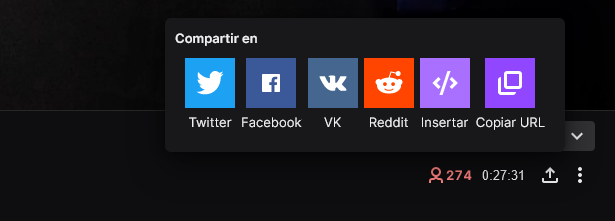
- From the lower right side of the video click on share and then Insert.
- A window with two options will appear: Video Player or Chat, the first one comes by default and is the one we will leave. We can do it in two ways with Javascript or by Iframe.
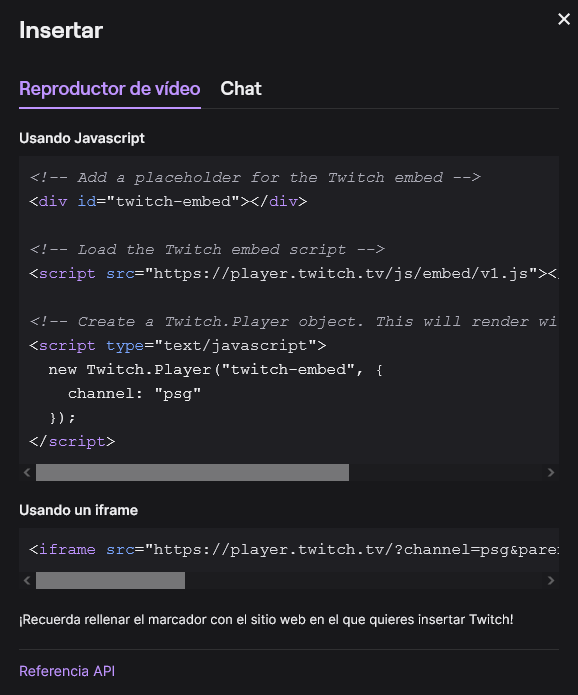
* We focus on Using an iframe and copy the code. Then we open WordPress – our entry – html block and copy it.
<iframe src="https://player.twitch.tv/?channel=psg&parent=www.example.com" frameborder="0" allowfullscreen="true" scrolling="no" height="378" width="620"></iframe>- Inside the html block we change www.example.com for the domain of your web e.g.: fransoler.net you can put it with or without www (depending on how you have it configured).
<iframe src="https://player.twitch.tv/?channel=psg&parent=fransoler.net" frameborder="0" allowfullscreen="true" scrolling="no" height="378" width="620"></iframe>This is the part that the following text warns us about:
Remember to fill in the bookmark (domain) with the website where you want to embed Twitch!
* Finally we update the page and that’s it.
With this we will have inserted correctly our Twitch video in WordPress.