

Google reviews. That double-edged sword that can raise you to the top or lower you to the quicksand. Many of you will have experienced that one day the mailbox rings and you find a comment or score that has nothing to do with the service provided or offered.
Well, from Business (Google Business), it gives you the possibility to “request” the removal of the unfair review you have received. Unfortunately for the business owner it is not as simple as clicking and deleting.
First you must access your profile in Company and go to the business that has received the complaint (if you have several profiles) click on your site and on the left side you will see a menu in which you must look for Reviews – You will see a list with all the scores and comments. – choose the desired one and select Mark as inappropriate.
A list of possible infractions that the user may have committed will appear. We choose the option that most closely resembles our circumstances and send it. After this, the only thing to do is to wait for the decision of the Company Profile team. They will reply by e-mail to let us know if they decide to discard it or keep it in public view.
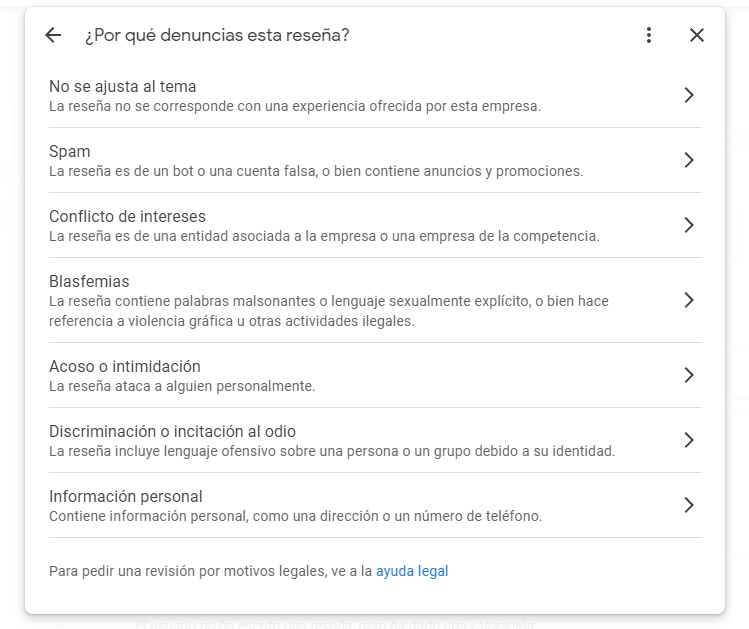
You can also request a review of the comment received for legal reasons, when the assessments pass into the realm of threats or ideas that may incur a possible crime.
For the time being, this is the only option available to try to exclude a criticism that in our opinion would be undue.